Full Basket guide: from an empty kiosk to a hypermarket town
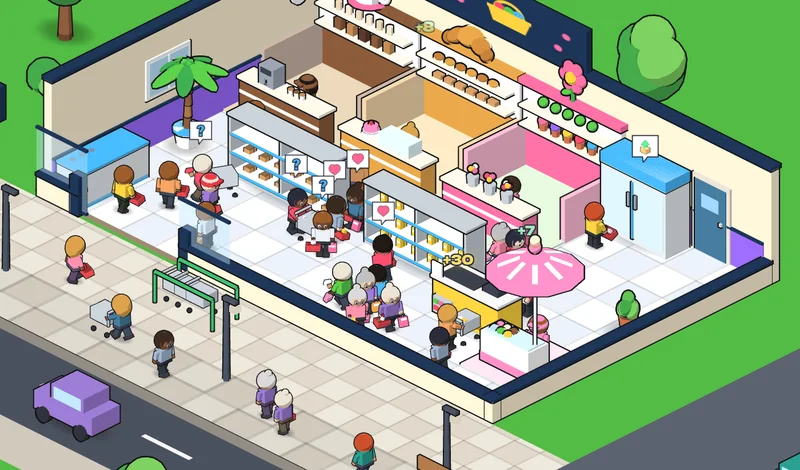
Full Basket is a cozy supermarket tycoon you play in the browser. You begin with an empty kiosk and end up with a street of markets, a square full of little shops and buses bringing people in. Here's how to get there without running out of money.
The first day
The game starts at 7:30, and the clock stands still until you open. You need two things: a till and a shelf. A hand shows you what to press, so just follow it. Put the shelf near the till, stock it and tap Open the shop.
If the hand gets in the way later, turn it off in Settings → Hints.
How a day works
- The shop opens at 8:00 and closes at 22:00, or at midnight once you have the night shift.
- After closing you see the day's sums: what sold and what you earned.
- At night time stops. That's the moment to build, move shelves and lay floor with no customers in the way.
Keep the shelves full
An empty shelf loses sales. Tap any shelf to open its panel: refill it, pick its goods, move it, turn it or sell it. Goods come from the storeroom, so order stock before it runs out. There are 20 products and 15 kinds of fixtures, from simple racks to fridges.
When you can afford it, hire stockers so you don't refill everything by hand, cashiers so the queue moves, and cleaners, because customers drop litter.
Grow the store
The building grows in 8 steps, from a kiosk to a hypermarket. Each step widens the door, raises the rent and adds things outside: a roof sign, a trolley bay, a car park, flags, balloons.
The store grows tile by tile. In the Buildings tab open floor mode and lay tiles, or press Grow evenly to lay the whole next step in one go. Your level caps how big the store can get, so keep levelling up: there are 20 levels and 24 goals.
Build a town
A second and a third lot go on sale along the street. In front of the markets lies the square. Put little shops there with their own sellers: coffee, bakery, flowers, pharmacy, ice cream, toys, clothes, pizza and electronics.
Car parks and bus stops bring more customers: cars drive in from the road, buses drop people off. Trees, flower beds, benches, lamps and a playground make the town nicer.
Controls
- Phone: tap to place and select, drag to move the view, pinch to zoom.
- Computer: the mouse wheel or Q / E turns the thing you're placing, Ctrl + wheel zooms.
Progress is saved in your browser, so you can close the tab and come back to the same town tomorrow.